Introducing Page Plan
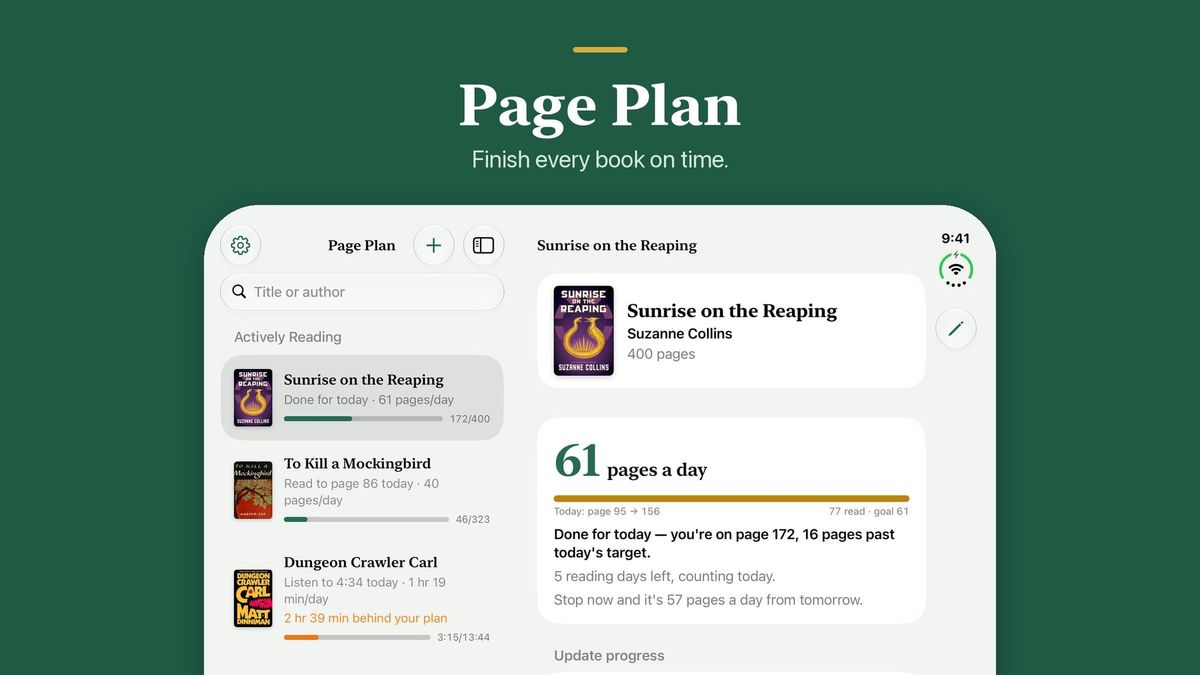
Page Plan tells you how many pages to read a day to finish on time.
This whole "here's an app that I'm releasing" is starting to become a habit.
Keeping up with a book club schedule seems easy on the surface.
- You have this book to read.
- You're meeting with your club on this date.
- So just read the book.
It's not that simple, though. You have so much competition for your attention that it's easy to find yourself scrambling to finish the book in the last few days before your book club.
I've talked before about participating in two different book clubs. Keeping up with one book club schedule is manageable. Keeping up with two book club schedules, though... I needed a little help.
Like any good techie, I turned to AI. First with ChatGPT, then later with Claude, I'd tell my "assistant" to plot out a reading plan for me.
Six basic inputs:
- I'm reading this book.
- It's for this book club.
- It has this many pages in the edition I'm reading.
- Today's date is this.
- The due date is this.
- I'm currently on this page.
I'd update the AI periodically with my progress. It would recalculate the number of pages I'd need to read each of the remaining days before the book club meets, if I wanted to finish on time.
This approach worked fine for me. It didn't guarantee that I'd finish on time, since that was entirely up to me. It gave me the plan to follow, though. And, importantly, the plan would adjust on the fly, whether I was racing ahead or falling behind.
In parallel, I've been scratching the itch to build, thanks to Claude Code. Last month, it was my Movie Loft project.
My friend Jason Pascual just released his iOS app, Divello: Split Expenses, for which I was one of his TestFlight users. After talking with him about the development experience a bit, I decided to try my hand at building my own iOS app.
Movie Loft wasn't the right candidate. While I love what I built there, it has far too many technical dependencies to be an app that others could get from the App Store.
On the other hand, turning my reading pace planning process into a full-featured application was a slam dunk.
It took one Wednesday evening to go from concept to a working build on my iPhone.
By Thursday evening, I had iCloud sync working across my iPhone and iPad. And I had the app set up on TestFlight, which meant I could start sharing the link out to some friends for testing.
By Friday evening, I was submitting the app to the App Store for review.
While I waited for the App Store review, I was updating the app routinely, based on my own daily usage, as well as from feedback I was receiving from my friends.
- "What about e-books?"
- "What about audiobooks?"
- "What about audiobooks, where I listen at 1.25x speed?"
- "What about multiple reminders throughout the day?" (coming in v1.1)
- "I read 5 pages a day, when will I finish the book?" (coming in v1.1)
My testers and I found a few bugs and UX quirks along the way.
- The crash when deleting a book from your list.
- The light mode/dark mode getting all mixed up. (coming in v1.1)
- The "share my goal progress to Instagram" failing miserably at first. (coming in v1.1)
- The confusing wording when you'd fall behind pace, or switch to monthly/yearly goal tracking instead of a deadline. (coming in v1.1)
The use cases also expanded. The core concept of finish every book on time fit other use cases besides just book clubs.
- Borrowing books from the library, so you can finish before you have to return the book. Especially for those hot/new titles where you can't keep renewing the borrow.
- Finishing a reading assignment for class, so you can manage your schoolwork. Applies for college students, high school students, etc.
- Handing out that reading assignment for class, so you can tell your students what they should plan towards. Applies for teachers at any level.
And in one suggested use case, the core concept of finish every book on time applied, but with a twist:
- Tracking reading goals, so you can plan out the pace you need to nail your monthly or yearly goals. All the 'guts' to support this use case were already there in the app, so it was a no-brainer to add a little extra functionality on top. (coming in v1.1)
I had to make some hard decisions on what not to add to the app, as feedback came my way.
- I wanted to keep the vibe positive and encouraging, which meant saying 'no' to some gamification/competition ideas.
- I wanted to ensure the app does not collect data about you, which meant saying 'no' to some integration ideas.
- I wanted to release the app for free, at least in its initial form, which meant limiting my own costs.
- I wanted to focus on the iOS ecosystem first, which meant saying 'no' to Android users, at least at the start.
I'm not going to say none of these things will change over time. I'll listen to user feedback, and see what captures their imagination. And yet, these seem like important values and principles to maintain as much as possible.
More than a week went by, with no progress on the Apple App Store review process. I didn't think what I was submitting for review was all that controversial. Maybe I was just stuck in a queue somewhere in the process?
Last night, I finally gave Apple a little poke, requesting an expedited review. A few hours later, the app was approved for distribution through the App Store.
Then I had to get to work on all the infrastructure around the app. A domain, a web page, an email address, social media handles. This blog post.
So, without further ado, let me introduce you to Page Plan.
Book club Thursday. Library book due back. Movie out next month. Add the book and the date, and Page Plan tells you how many pages a day to finish on time.
Free for iPhone and iPad. No ads, no account.

Version 1.0 is now available for iOS and iPadOS. Version 1.1 is built, and I expect to release it in December.
I'd love to hear from you if you've installed Page Plan. help@pageplan.co is open.
Happy reading!